
HP LaserJet Managed and Enterprise A3 - How to check the low voltage power supply (LVPS)
ish_11021407-11021474-16 | For HP And Channel Partner Internal Use
Last modified date: 2025-10-16
Learn how to test the low voltage power supply (LVPS).
When print quality problems occur, technicians might have difficulty determining if LVPS is at fault and if they should replace LVPS.
The following procedures will help the technician test the LVPS and when to replace it with confidence.
For specific printer model testing, choose the printer being worked on from the following list.
- Go to: Chunk_11021474.html#GUID-5E7709CE-5856-48AF-8079-AD0042318ACD__GUID-5E148AF3-ABA7-4F41-A890-EF3E342FEDB6
- Go to: Chunk_11021474.html#GUID-17F501CE-1F7D-4E7A-ABAE-283CA1010D14__GUID-186510C6-3AD8-46E4-AC02-92D7C8C65C0D
- Go To: E82540-E82560, E82540du-E82560du, E87640-E87660, E87640du-E87660du - LVPS Type 5H test procedure
Tools needed
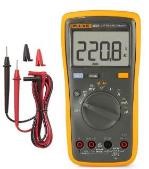
Digital voltmeter
MFP E826, E877 LVPS test procedure
Use the following steps to test the LVPS.
Part information
Part numbers | |
Part Number | Part Description |
JC44-00149C | Low-Voltage Power Supply (LVPS), 110V |
JC44-00150C | Low-Voltage Power Supply (LVPS), 220V |
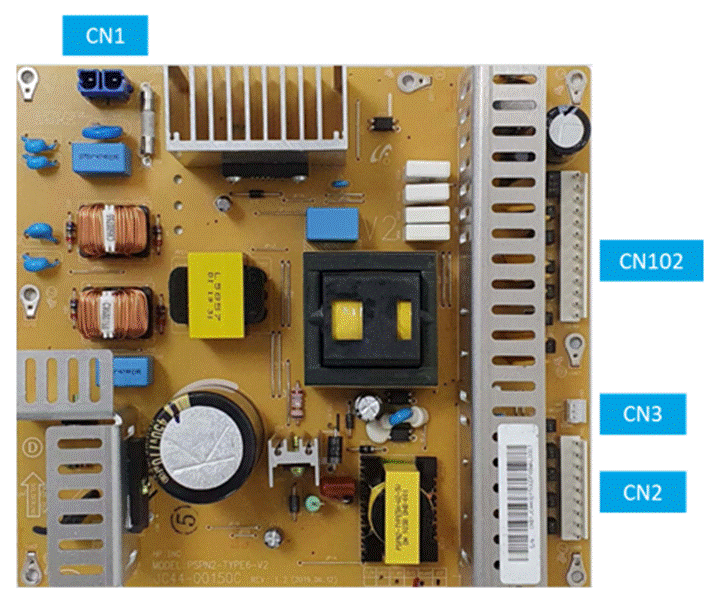
Lower Voltage Power Supply (LVPS)
Connections | ||
CN No. | Connection | Type |
CN1 | FDB-CN7 | 2 pin |
CN2 | Main-J60 | 9 pin |
CN3 | Main-J49 | 3 pin |
CN101 | Main-J60 | 13 pin |
- Set the digital voltmeter to DC Voltage.
- Check the output voltages at the measuring point when printing or initializing.
Voltage test
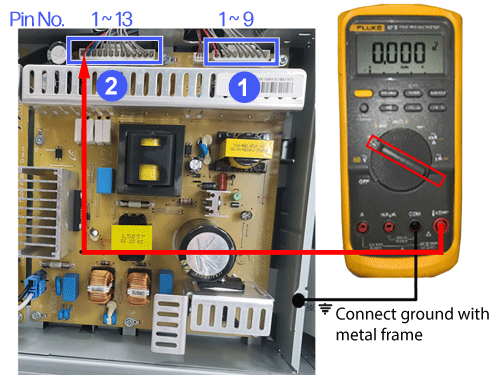
- Callout 1
Measurement points | ||
Pin No. | Pin 1, 3, 5, 7, 9 | Pin 2, 4, 6, 8 |
Voltage | 5V DC (about 5.2V) | 0V (GND) |
Fuse No. | F151 - F155 | - |
- Callout 2
Measurement points | ||||||||
Pin No. | Pin 2,4,6,8,10,12 | Pin 1 | Pin 3 | Pin 5 | Pin 7 | Pin 9 | Pin 11 | Pin 13 |
Voltage | 0V | 24V DC | 24V DC | 24V DC | 24V DC | 24V DC | 24V DC | 24V DC |
Fuse No. | GND | F51 | F52 | F53 | F54 | F55 | F56 | F57 |
Connection | ISA | BLDC Motor/Relay for Fuser TC sensor Step Motor for Registration, Pickup_1/2 Clutch for MP1/2 Solenoid for Exit, MP ACR/CTD 5V DCF/ HCF | BLDC Motor for OPC_K HVPS Step motor for WTB_Tank/Duct, Duplex | Motor for LSU BLDC Motor for DEVE_K, OPC_M/C DC motor for ACR_Shutter Fan for EXIT_1/2/3/4, SIDE_1/2/3, FUSER_OUT, DEVE Step motor for LSU shutter, T1, Reservoir_MY/KC, Toner_LOCK_Y/M/C, SKEW_Y/M/C | BLDC Motor for DEVE_YMC, OPC Step Motor for FEED, FUSER_Relay, Toner_LOCK_K, Duplex_Return, Duplex 1 | Finisher | Fan for LVPS, FDB, Front, LSU Finisher | |
- Turn the printer off and disconnect the power cord.
Warning:
Do not test resistance with power on!
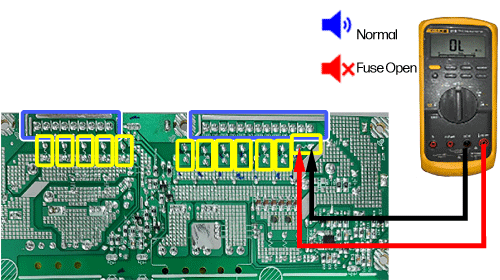
- Change the voltmeter to test resistance (Ohms) with volume monitoring.
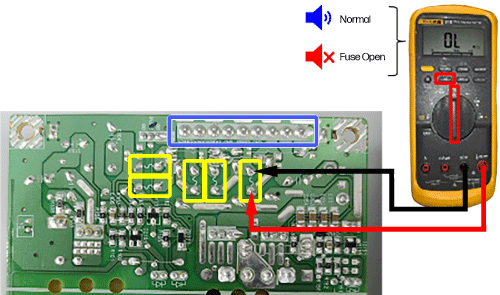
- Test each fuse individually in the following image as outlined in yellow.
- A good fuse should read ~ 0 Ohms and you should hear an audible notification.
- An Open or Blown fuse has no reading and no audible notification.
If Fuse is Open/Blown, replace the LVPS.
Continuity test
Important:
Test each fuse using the 2 points outlined in yellow.
MFP E730, E731, E785, E876 - LVPS test procedure
Use the following steps to test the LVPS.
Part information
Part numbers | |
Part Number | Part Description |
5QJ90-60014 | Low-Voltage Power Supply (LVPS), 110V |
5QJ90-60015 | Low-Voltage Power Supply (LVPS), 220V |
Lower Voltage Power Supply (LVPS)
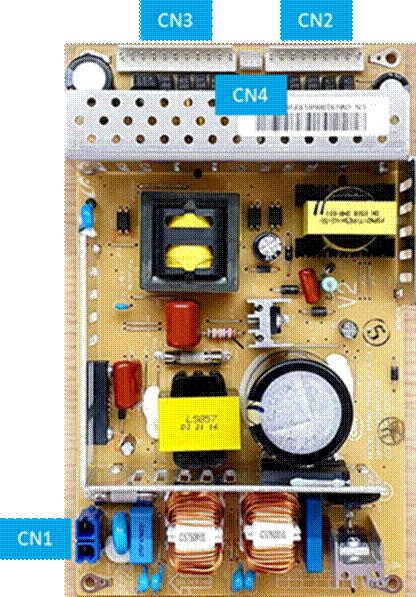
Connections | ||
CN No. | Connection | Type |
CN1 | FDB-CN7 | 2 pin |
CN2 | Main-J8 | 9 pin |
CN3 | Main-J8 | 11 pin |
CN4 | Main-J67 | 3 pin |
- Set the digital voltmeter to DC Voltage.
- Check the output voltages at the measuring point when printing or initializing.
Voltage test
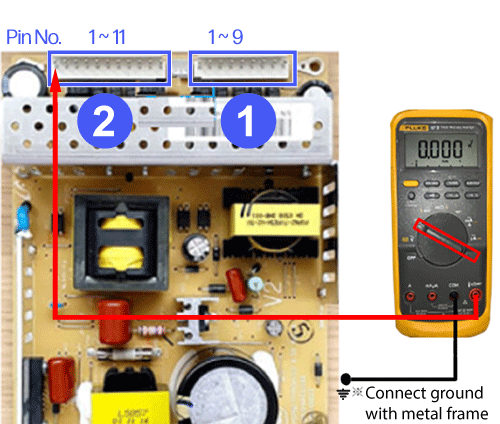
- Callout 1
Measurement points | ||
Pin No. | Pin 1, 3, 5, 7, 9 | Pin 2, 4, 6, 8 |
Voltage | 5V DC | 0V (GND) |
Fuse No. | F151 - F155 | - |
- Callout 2
Measurement points | |||||||
Pin No. | Pin 2,4,6,8,10 | Pin 1 | Pin 3 | Pin 5 | Pin 7 | Pin 9 | Pin 11 |
Voltage | 0V | 24V DC | 24V DC | 24V DC | 24V DC | 24V DC | 24V DC |
Fuse No. | GND | F151 | F152 | F153 | F154 | F155 | F156 |
Connection | ISA | Step Motor for LSU shutter (C) Finisher | Finisher Fan for OPC front/rear | Step motor for ITB engage, Duct, Exit 1/2,Toner YMCK, Toner duct YMCK BLDC motor for fuser DC motor for Toner YMCK, ACR shutter Fan for fuser, duplex front/rear . Solenoid for MP, duplex | DCF/HCF Step motor for Duplex, Pickup1/2, FEED, WASTE HVPS Relay for fuser ACR/CTD 5V | LSU BLDC motor for deve CMYK, OPC CMY Fan for LVPS, Deve | |
- Turn the printer off and disconnect the power cord.
Warning:
Do not test resistance with power on!
- Change the voltmeter to test resistance (Ohms) with volume monitoring.
- Test each fuse individually in the following image as outlined in yellow.
- A good fuse should read ~ 0 Ohms and you should hear an audible notification.
- An Open or Blown fuse will have no reading and no audible notification.
Continuity test
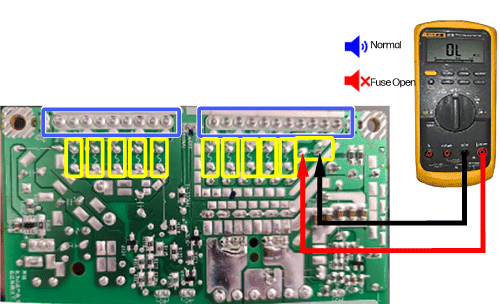
If Fuse is Open/Blown, replace the LVPS.
Important:
Test each fuse using the 2 points outlined in yellow.
E82540-E82560, E82540du-E82560du, E87640-E87660, E87640du-E87660du - LVPS Type 5H test procedure
Use the following steps to test the LVPS.
Part information (TYPE 5H)
Note:
For LVPS Type 4 Go here: E82540-E82560, E82540du-E82560du, E87640-E87660, E87640du-E87660du - LVPS Type 4 test procedure
Part numbers (TYPE5H) | |
Part Number | Part Description |
JC44-00249A | LVPS TYPE 5H (110V) |
JC44-00250A | LVPS TYPE 5H (220V) |
Lower Voltage Power Supply (LVPS)
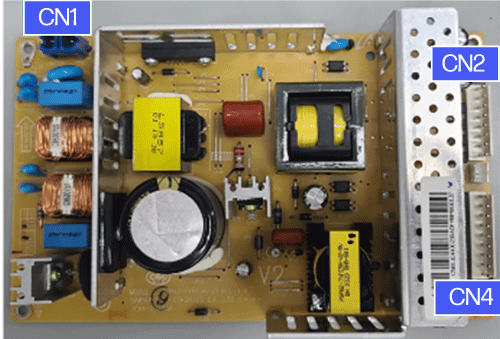
Connections | ||
CN No. | Connection | Type |
CN1 | FDB-CN | 2 pin |
CN2 | Main-J | 8 pin |
CN4 | Main-J | 9 pin |
- Set the digital voltmeter to DC Voltage.
- Check the output voltages at the measuring point when printing or initializing.
Voltage test
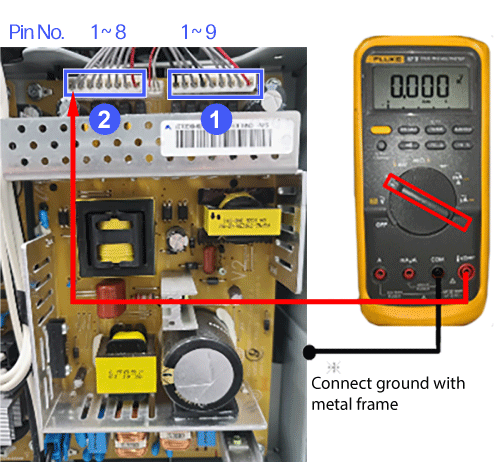
- Callout 1
Measurement points | ||
Pin No. | Pin 1, 3, 5, 7 | Pin 2, 4, 6, 8 |
Voltage | 5V DC | 0V (GND) |
Fuse No. | F101 - F105 | - |
- Callout 2
Measurement points | ||
Pin No. | Pin 1, 3, 5, 7, 9 | Pin 2, 4, 6, 8 |
Voltage | 24V DC | 0V (GND) |
Fuse No. | F3 - F6 | - |
- Turn the printer off and disconnect the power cord.
- Change the voltmeter to test resistance (Ohms) with volume monitoring.
- Test each fuse in the following image as outlined in yellow.
- A good fuse should read ~ 0 Ohms and you should hear an audible notification.
- An Open or Blown fuse will have no reading and no audible notification.
If Fuse is Open/Blown, replace the LVPS.
Continuity test
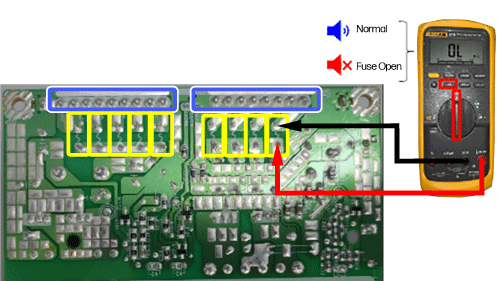
Important:
Test each fuse using the 2 points outlined in yellow.
E82540-E82560, E82540du-E82560du, E87640-E87660, E87640du-E87660du - LVPS Type 4 test procedure
Use the following steps to test the LVPS.
Part information
Part numbers | |
Part Number | Part Description |
JC44-00091D | LVPS TYPE4 (110V) |
JC44-00092D | LVPS TYPE4 (220V) |
Lower Voltage Power Supply (LVPS)
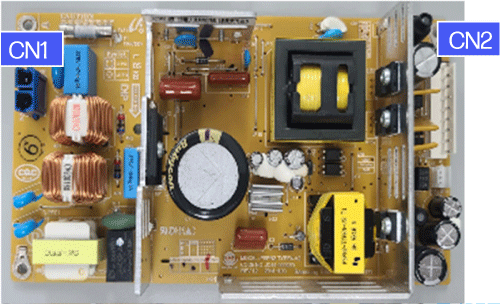
Connections | ||
CN No. | Connection | Type |
CN1 | FDB-CN7 | 2 pin |
CN2 | Main-J8 | 9 pin |
- Set the digital voltmeter to DC Voltage.
- Check the output voltages at the measuring point when printing or initializing.
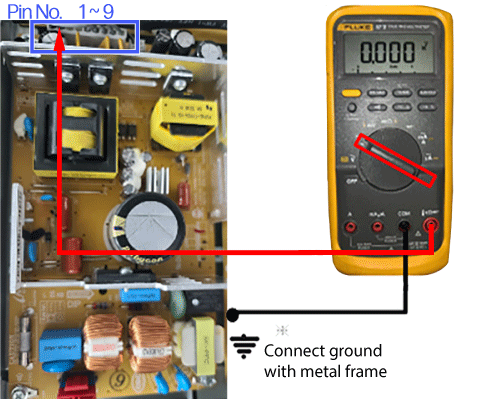
- Callout 1
Measurement points | |||
Pin No. | Pin 1, 3, | Pin 5, 7, 9 | Pin 2, 4, 6, 8 |
Voltage | 5V DC (about 5.2V) | 24V DC | 0V (GND) |
Fuse No. | F101, 102 | Fuse 151-153 | - |
- Turn the printer off and disconnect the power cord.
- Change the voltmeter to test resistance (Ohms) with volume monitoring.
- Test each fuse in the following image as outlined in yellow.
- A good fuse should read 0 Ohms and you should hear an audible notification.
- An Open or Blown fuse will have no reading and no audible notification.
If the Fuse is Open/Blown, replace the LVPS.
Continuity test
Important:
Test each fuse using the 2 points outlined in yellow.